Internet Security and Scam Awareness
How to Determine Whether a Customer Service Website Shown in Search Results Is the Company’s Official Website
 0
0
 0
0
Searching for a company’s customer support hotline, refund portal, or technical help desk on a major search engine seems like a routine task. However, typing queries such as “airline customer service phone number,” “banking support line,” or “tech hardware warranty claim” frequently exposes internet users to sophisticated cyber deception. Search Engine Results Pages (SERPs) are heavily targeted by offshore call-center scammers, phishing operators, and tech-support fraud networks using paid advertising and black-hat search engine optimization (SEO).
Landing on a spoofed customer service website often leads to immediate financial and privacy loss – from incurring exorbitant toll-free routing fees to having full credit card details, account credentials, or remote desktop control hijacked. A top-ranking placement on Google or Bing does not equal official brand authorization. Authenticating an official customer service website requires auditing domain syntax, spotting sponsored ad cloaking, evaluating on-page security indicators, and utilizing safe navigation protocols.
Search engine manipulation: Why top results are not always official
The most common misconception among digital consumers is the belief that search engine algorithms naturally filter out fraudulent websites. Scammers actively exploit search engine mechanics to place fake support portals directly in front of motivated users.
Sponsored ad cloaking and fake toll-free numbers
The most aggressive attack vector involves purchasing “Sponsored” or “Ad” placements at the very top of search results pages. Scammers buy targeted keywords for major airlines, financial institutions, and software companies.
Because sponsored ads bypass organic search ranking algorithms, a fake customer support website can appear above the legitimate brand’s actual homepage. These paid ads feature prominent, click-to-call toll-free numbers (such as 1-800 or 1-888 numbers). When dialed, the call is routed to an offshore boiler-room call center where operators pretend to represent the brand, claiming a “refund fee” or “account verification charge” is required before assisting you.
Domain typosquatting and deceptive TLDs
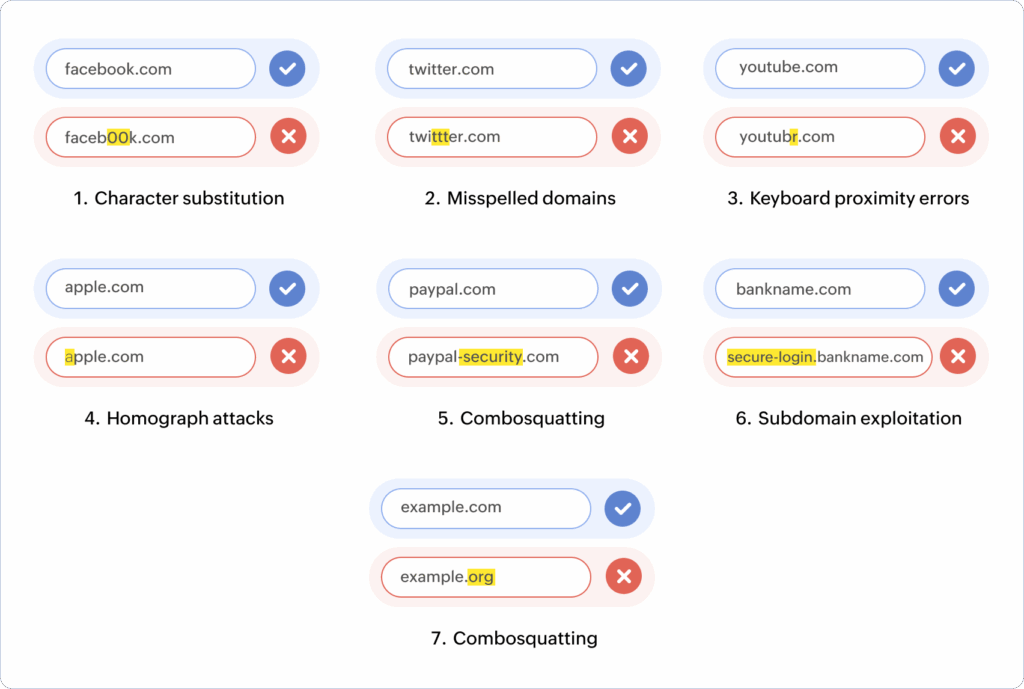
When reviewing organic search listings, scrutinize the domain name syntax. Scammers rely on typosquatting (registering misspellings of famous brand names) or combining the brand name with deceptive keywords.
A legitimate support portal almost always exists as a subdirectory or subdomain on the primary corporate domain (e.g., support.brand.com or brand.com/help/). Fraudulent sites, by contrast, utilize unnatural domain structures:
- Hyphenated Variants: brand-customer-service-line.com or brand-support-help.com.
- Deceptive Top-Level Domains (TLDs): Replacing official .com or country-code TLDs (like .co.uk or .co.kr) with cheap, unmonitored TLDs like .info, .biz, .care, or .xyz.
- Character Substitution: Replacing lowercase letters with visually similar characters (e.g., brand-supp0rt.com).
Structural comparison between official support portals and spoofed sites
To rapidly evaluate whether a customer service landing page is an authorized corporate portal or a spoofed third-party scam site, cross-reference the page against this structural audit matrix:
| Inspection parameter | Official brand support portal | Spoofed / Third-Party scam site | Risk & verification action |
| Domain Architecture | Exact brand domain or official subdomain (support.brand.com). | Hyphenated keywords or unusual TLDs (brand-care.xyz). | Critical Risk. Close tab immediately if domain syntax contains extra words. |
| Primary Contact Method | In-app messaging, verified ticketing, or published global numbers. | Prominent, urgent “Call 1-800 Now” pop-ups and click-to-call buttons. | High Risk. Never call numbers listed on unverified third-party landing pages. |
| Data Prompts | Requires logging into your existing account dashboard first. | Prompts for full credit card details or SSN on the landing page. | Critical Risk. Official support never demands full card numbers for help. |
| Remote Access Requests | Extremely rare; strictly controlled via proprietary enterprise tools. | Demands installation of software like AnyDesk or TeamViewer. | Immediate Red Flag. Never allow remote PC access from inbound/unverified calls. |
On-page content verification and red-flag indicators
If you click a search link and land on an unfamiliar support page, auditing the on-page content reveals clear indicators of authenticity or fraud.
Immediate requests for sensitive financial or remote access data
Legitimate corporate customer service portals are designed to troubleshoot problems, not collect sensitive financial credentials on an unauthenticated landing page. If a support site immediately prompts you to enter a full 16-digit credit card number, bank PIN, or Social Security number just to “verify your account identity,” leave the site instantly.
An even more severe red flag is the demand for Remote Desktop Access. Scammers operating fake tech-support sites will instruct you to download and install third-party remote access software – such as AnyDesk, TeamViewer, or LogMeIn. Once installed, the scammer gains full remote control over your computer, allowing them to install keyloggers, access online banking sessions, or lock your files behind ransomware. Official customer support representatives will never require remote desktop control to resolve basic account or billing inquiries.
Authentic corporate websites maintain a verifiable physical and legal footprint. Scroll down to the very bottom (footer) of the customer service webpage:
- Copyright Notices: Official sites display a current copyright year accompanied by the registered corporate legal entity name (e.g., “© 2024 Brand Name, Inc. All rights reserved.”). Fake sites often display outdated copyright years or generic text.
- Physical Address & Legal Disclaimers: Legitimate corporate pages link to official Privacy Policies, Terms of Service, and a physical headquarters address. Spoofed sites usually omit physical addresses or link to dead, non-functional text placeholders.
Rather than risking your data on unverified search engine results, adopt these safe navigation protocols to guarantee you connect with genuine support teams.
- Direct Root Navigation: Never search for customer service phone numbers directly. Instead, type the main brand URL (brand.com) into your browser address bar. Once on the official homepage, locate the “Help,” “Support,” or “Contact Us” link in the header or footer. Following internal navigation links from the verified root domain guarantees you reach an authentic support portal.
- Utilizing Verified Social Media Channels: Major brands maintain verified customer care accounts on major social networks (such as X/Twitter, Facebook, or LinkedIn). Look for official verification badges. Customer care teams frequently publish direct links to their official help centers on their verified profiles.
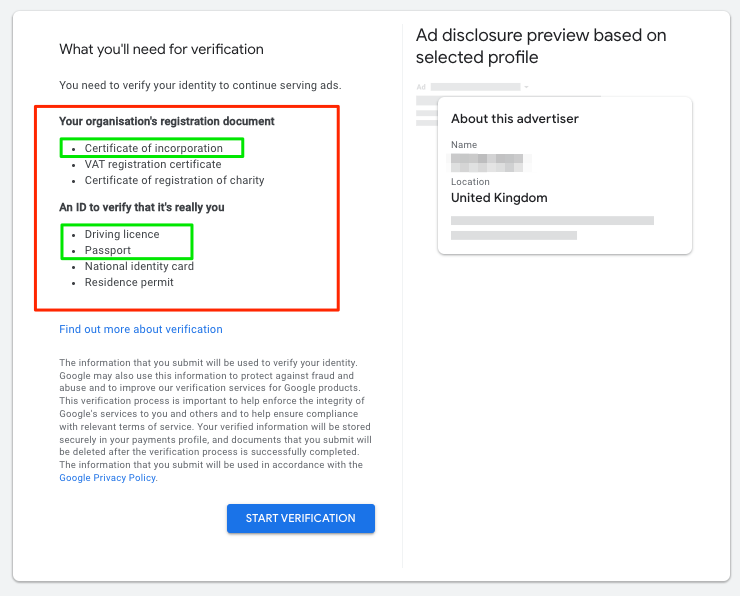
- Auditing Search Advertisers via Ad Transparency: If you must use search engines, verify “Sponsored” ads before clicking. Click the three vertical dots next to a sponsored search ad on Google to open the Advertiser Transparency Box. This reveals the legal name and country of the entity paying for the ad, allowing you to confirm whether the ad is paid for by the actual brand or an unrelated third-party marketing firm.


